

Access to the Interface
General
Section titled “General”Access to the MQTT Broker in Xesar is established with a mutually authenticated TLS connection. For this a client key and certificate is required.
The access rights corresponding to specific commands are bound to the user groups that the user that you are downloading for belongs to.
The API Documentation will always present the required rights for that specific action.
So always look out for Required permission in the documentation.
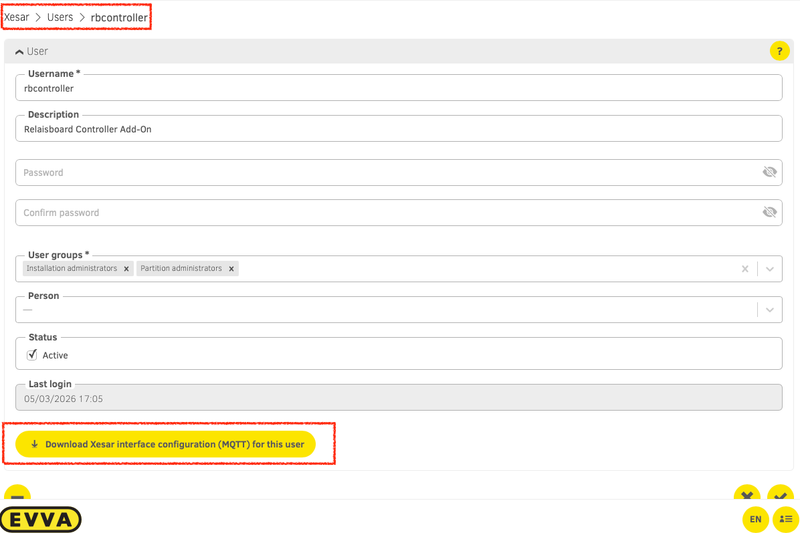
Download via UI
Section titled “Download via UI”You can download the access configuration with the key and the certificate manually from a user.
Obtain via REST interface
Section titled “Obtain via REST interface”You can also obtain the certificates and authorization token through a REST API.
The following example shows how to obtain the MQTT access configuration using curl and jq and
can be easily implemented in any programming language that supports HTTP requests and JSON parsing.
- Obtaining the authorization token:
POST /api/v1/loginwith Body:{ "name": "username", "password": "password" } - Obtaining the MQTT access configuration:
GET /api/v1/user/mqtt-configurationwith the obtained token in theAuthorizationheader.
# Using curl and jq - make sure you adjust the HOST, USERNAME and PASSWORD to your system
HOST="example.com"USERNAME="foo"PASSWORD="bar"
# Fetch an authorization tokenTOKEN=$(curl -X POST "https://${HOST}/api/v1/login" -H "accept: application/json" -H "Content-Type: application/json" -d "{ \"name\": \"${USERNAME}\", \"password\": \"${PASSWORD}\"}" | jq -r '.token')
# Get the MQTT access configuration - this will return the MQTT broker address, port and authorization token as well as the certificate required to authenticate with the broker.curl -X GET "https://${HOST}/api/v1/user/mqtt-configuration" -H "accept: application/json" -H "Authorization: Bearer ${TOKEN}" | jq
The response will contain the following information:
{ // The Base64 encoded (PEM) certificate, certificate authority and key "ca": "string (base64)", // The certificate authority (PEM) "cert": "string (base64)", // The certificate (PEM) "key": "string (base64)", // The private key (PEM) // The MQTT connection properties "apiProperties": { "userId": "string (uuid)", // The user ID "brokerAddress": "string", // The broker address "brokerPort": integer, // The broker port "token": "string" // The publish authorization token }}